Music meets navigation.
Run your chosen music and maps apps in two independent windows. Tap to rebalance, double-tap to open an app, or hold to choose another.
 DualDash
BUILT FOR YOUR ANDROID COCKPIT
A focused launcher for two-screen head units. Keep your apps side by side, with your car’s information right where it belongs.
Android 13+ · Compatible FYT hardware required
Hybrid energyIn view
Current tripAt a glance
Car settingsWithin reach
LESS SWITCHING. MORE CLARITY.
Run your chosen music and maps apps in two independent windows. Tap to rebalance, double-tap to open an app, or hold to choose another.
MyPorsche brings supported hybrid, trip and vehicle information together. Use the second screen, or add an equal-width third column.
New releases download in the background. Open Updates while parked, then install yourself or enable automatic installation for that session.
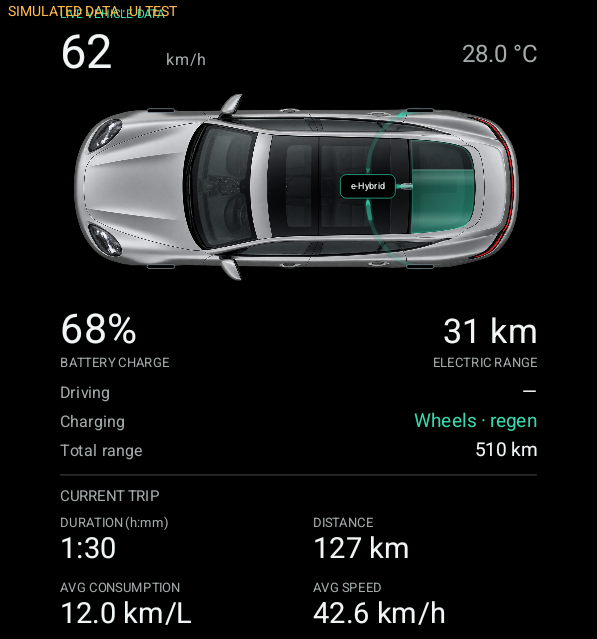 ACTUAL APP CAPTURE / SIMULATED TEST DATA
MY PORSCHE, REIMAGINED
See the direction of hybrid energy, battery charge, speed and trip details in one considered layout. Vehicle settings stay close, without taking over the screen.
Readings depend on the firmware and CAN decoder. Energy arrows are provisional interpretations, not independently measured power flow.
A SPECIALIST LAUNCHER
This is a hobby project built around an FYT UIS7870 Android 13 head unit and a Panamera S e-Hybrid. It is not a universal car launcher or an official Porsche product.
Release details will appear here when the server is available.
SHA-256
Available with release informationAndroid package: com.syu.launcher.dualpane
SET UP ONCE. KEEP IT CURRENT.
Builds before 0.39 use a different signing key. Back up settings and logs, then uninstall the old DualPane app before installing this release. Uninstalling removes app-local preferences and ADB authorization keys. Wheel key files stored separately are not part of this APK.
Download the APK to the head unit, open it and approve installation from that source. Open DualPane, choose your apps and reconnect the window helper. Keep the stock Home app available.
Hold Settings in the right rail → App updates. Allow DualPane to install updates in Android settings. Downloads are automatic; for installation, confirm you’re parked and optionally enable auto-install while that screen stays open. Android may still ask for confirmation.
A FEW THINGS TO KNOW
Downloading does not restart the launcher. Installation does. Before installation, hosted tasks are moved to the main display and their release is acknowledged. The operating system and individual apps still control playback and navigation continuity. Always update while parked.
The update feature requests a public release manifest and APK. It does not upload CAN logs, vehicle readings or identifiers. The website has no analytics or third-party scripts. Standard web-server access logs can contain IP addresses and request details.
No. This is an independent enthusiast project, not affiliated with Porsche, Google, Spotify or the head-unit manufacturer. Vehicle functions and camera availability depend on the firmware and decoder. Do not rely on this interface for safety-critical warnings.
The updater uses Android’s package installer, not a root exploit. Android 13 may allow self-updates without a second confirmation after the install permission is granted. Other Android versions or firmware policies can still require the system installation prompt.